Reqly: A Mobile API Testing Client Built with React Native and Expo
@himanshuchandola||4 min read
I built Reqly — a mobile app that lets you test RESTful APIs from your phone. No Postman on the desktop, no switching devices: you fire requests, tweak headers and body, and see the response right there. In this post I’ll walk through what it does, the stack, and why I built it as a React Native + Expo app.
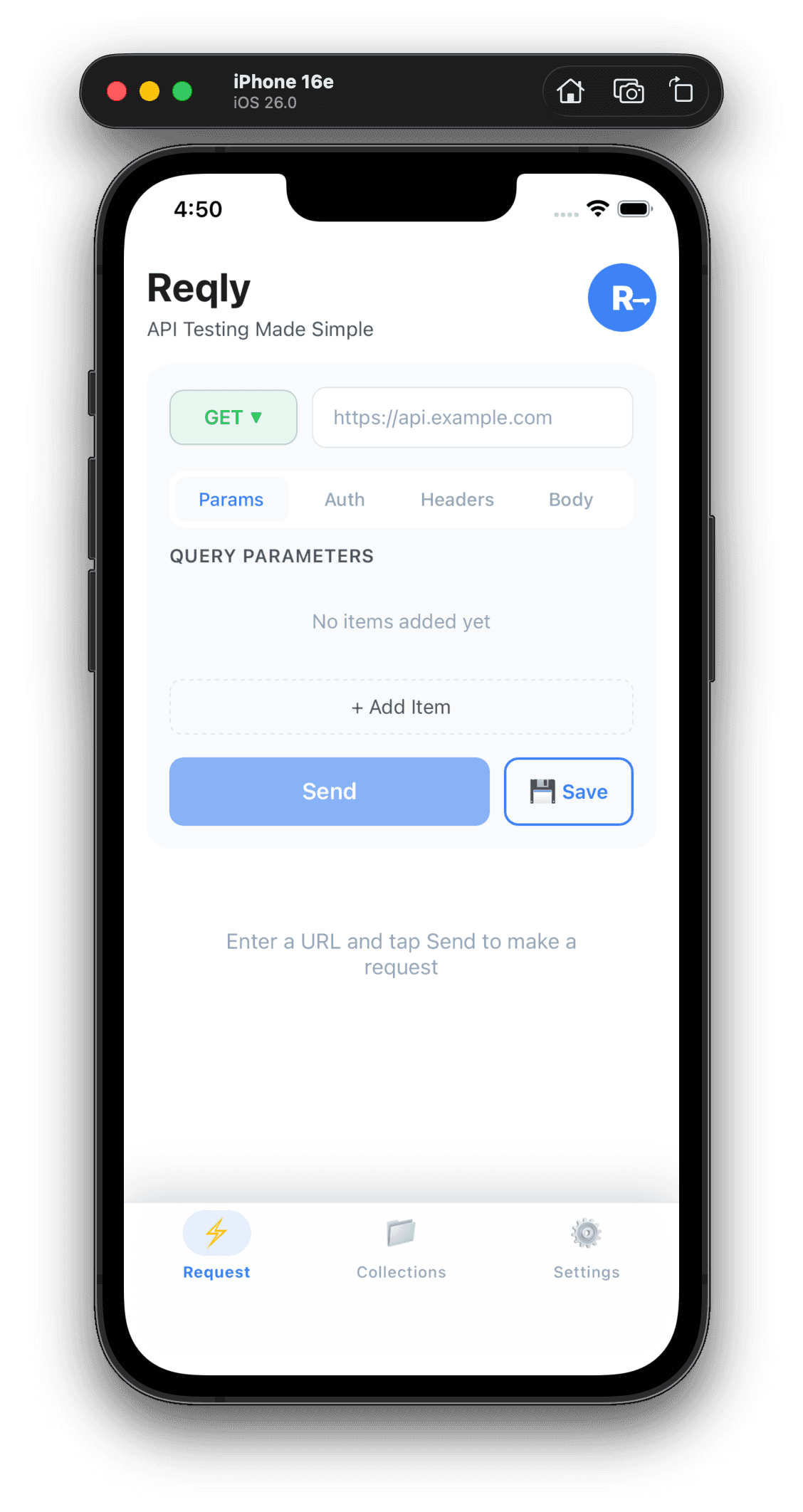
What Reqly Does
Reqly is an API testing client for iOS and Android. You enter a URL, choose a method (GET, POST, PUT, DELETE, PATCH, OPTIONS, HEAD), add headers and body, and send the request. You get back status code, response time, headers, and body (with basic formatting). It’s built for quick checks and debugging when you’re away from your machine — on the go, in a meeting, or testing from a real device.
Request Builder
The main screen is a request builder. You set the URL and HTTP method from a dropdown. A query params section lets you add, edit, and remove query parameters in a structured way instead of hand-editing the URL. Headers are key–value pairs: you can add custom headers (e.g. Authorization, Content-Type, X-Request-ID) and edit or remove them. The body editor supports plain text and JSON — useful for POST/PUT/PATCH payloads. Everything is laid out for touch: large tap targets, clear labels, and a send button that triggers the request. The app uses the device’s network stack, so requests go out from your phone or tablet and you see real response times and behavior on that device.
Response View
After sending, you see status code (e.g. 200, 404, 500), response time in milliseconds, response headers, and response body. The body is shown in a scrollable view with basic formatting so JSON and text are readable. There’s no syntax highlighting or full “Postman-style” response tabs — the goal is to quickly see whether the request succeeded and what came back, without opening a laptop.
Collections
Reqly lets you save requests into collections. You can store the URL, method, headers, body, and query params, then load a saved request and run it again. Collections are stored locally on the device (no account or cloud sync). That’s handy for recurring checks — e.g. a health endpoint, a staging API, or a webhook URL you hit often. You can organise requests in a list and tap one to load it into the builder.
Settings and Behaviour
The app respects system light/dark mode so the UI matches your device theme. Offline handling is explicit: if the device has no network, you get clear feedback instead of a hanging request. There’s no backend or sign-in — all data (collections, preferences) stays on the device until you send a request over the network.
Why Build a Mobile API Client?
Most API testing is done on the desktop. I wanted the same capability on the phone: hit a staging or internal API from a device, test webhooks or mobile-specific flows, or quickly inspect a response without opening a laptop. Reqly is that — minimal setup, no account required, and everything stays on the device until you send a request. Use cases include: checking a health or status endpoint while away from your desk, testing how an API behaves from a real mobile network, debugging webhook payloads by sending a test request from your phone, and keeping a small set of saved requests for recurring checks without firing up Postman or curl.
Tech Stack
- React Native with Expo — Single codebase for iOS and Android, fast iteration with Expo’s tooling
- TypeScript (strict) — Fewer runtime surprises and better refactors
- Expo Router — File-based routing for tabs (Home, Collections, Settings)
- Native HTTP — Using
fetchand Expo’s networking so requests run on the device - Local storage — Persisting collections and preferences on the device
- Semantic Release — Automated versioning and changelog from conventional commits
- Husky + Commitlint — Consistent commit messages and hooks
- ESLint + Prettier — Lint and format
I chose Expo to avoid managing Xcode/Android Studio project files early on and to get OTA updates and EAS Build/Submit later. TypeScript and strict mode keep the codebase maintainable as the app grows.
Getting Reqly
- Source: github.com/himanshuchandola/Reqly
- Clone and run:
git clone https://github.com/himanshuchandola/Reqly.git && cd Reqly && pnpm install && pnpm start - Scripts:
pnpm android/pnpm iosto run on a device or simulator
The repo has a detailed README, screenshots, and contribution guidelines. If you’re into React Native or API tooling, you’re welcome to open issues or PRs.